
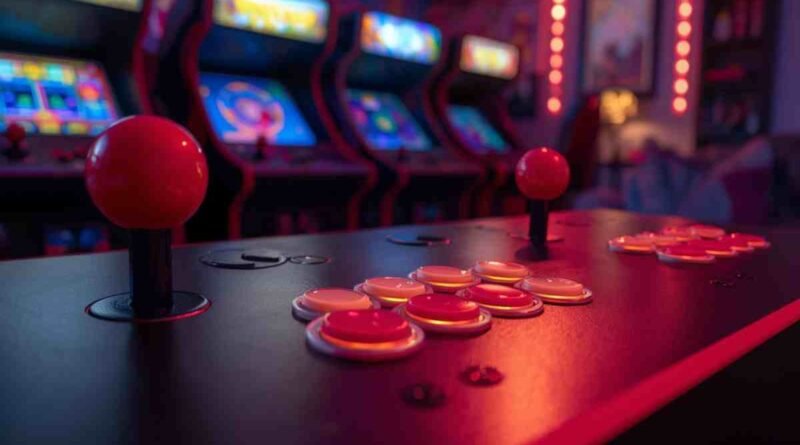
Arcade Multi Game Controller Panel Spinner and Tricker Stick
The Arcade Multi Game Controller Panel Spinner and Tricker Stick is one of those arcade upgrades that instantly changes how games feel. It’s not just about playing more titles. It’s about playing them the right way.
If you’ve ever tried a classic arcade game on a keyboard or basic joystick and felt something was off, this is why. Many old-school games were built around spinners and special control sticks. Without them, the experience feels flat.
This guide explains what these controller panels are, how they work, and why they still matter today, especially for home arcades.
What Is an Arcade Multi Game Controller Panel?
An arcade multi game controller panel is a single control surface designed to support many different arcade games.
Instead of being locked to one title, it combines multiple inputs like buttons, joysticks, spinners, and tricker sticks into one setup.
Simple definition
In simple terms, it’s a universal arcade control panel.
One panel. Many games. Real arcade feel.
Why multi-game panels exist
Original arcade cabinets were built for one game only. That worked in the 80s and 90s, but not anymore.
Multi-game panels exist because:
- Players want access to dozens or hundreds of games
- Home arcades need flexibility
- Emulation systems support many titles on one machine
A single-game panel just doesn’t make sense for most modern setups.
Difference between single-game and multi-game panels
Single-game panels are simple and authentic but limited.
Multi-game panels are flexible and future-proof.
The big difference is input variety. A multi-game panel includes specialized controls like spinners and tricker sticks that standard panels leave out.
Where these panels are commonly used today
You’ll find them in:
- Home arcade cabinets
- Retro gaming rooms
- Bars and cafés
- Gaming lounges
- Collector setups
They’re especially popular with players who want an authentic arcade feel without owning multiple cabinets.
Understanding Spinner and Tricker Stick Controls
These two inputs are what separate a basic arcade panel from a great one.
They’re also the reason many classic games still feel amazing decades later.
What Is a Spinner Controller?
A spinner is a round knob that rotates freely in both directions.
It’s designed for smooth, high-speed input rather than fixed movement.
How spinners work
Inside the spinner is an encoder that tracks rotation speed and direction.
The faster you spin it, the faster the in-game action responds.
Good spinners feel smooth, weighted, and precise.
Why rotation accuracy matters
Low-quality spinners skip inputs.
High-quality spinners feel natural and responsive.
Accuracy matters because:
- Small movements control fine actions
- Fast spins control power or speed
- Precision directly affects performance
In skill-based games, this makes a huge difference.
Games that rely on spinner input
Spinner-based gameplay is common in:
- Golf arcade games
- Paddle-style games
- Driving and steering titles
- Timing-based sports games
Without a spinner, these games lose their original design intent.
What Is a Tricker Stick?
A tricker stick looks similar to a joystick but behaves very differently.
It allows precise directional control without fixed click points.
How it differs from a joystick
Traditional joysticks move in set directions.
A tricker stick allows smooth, analog-style motion.
This makes it better for:
- Fine angle control
- Gradual movement changes
- Sports-based actions
Precision and directional control
Tricker sticks respond to subtle hand movements.
You don’t just push, you guide.
This level of control rewards skill and practice.
Why it suits sports and action games
Sports and action games rely on timing, angle, and speed.
Tricker sticks give players control over all three.
That’s why they’re often paired with spinners in arcade setups.
How These Controls Changed Classic Arcade Gameplay
Early arcade games pushed hardware limits.
Buttons and joysticks worked, but they weren’t always enough.
Why traditional buttons weren’t enough
Buttons are binary. On or off.
Many games needed more nuance.
Spinners and tricker sticks added:
- Variable speed
- Smooth transitions
- Real-world motion feel
This opened the door to deeper gameplay.
Player skill vs hardware precision
Classic arcade games weren’t forgiving.
Better hardware meant:
- More consistent input
- Fewer missed actions
- Skill-based outcomes
Great players could feel the difference instantly.
Tactile feedback and arcade realism
Arcades were physical experiences.
The weight of a spinner.
The resistance of a tricker stick.
The sound of mechanical parts moving.
That tactile feedback is still hard to replicate any other way.
Golden Tee Arcade Game and Controller Design
No game shows the value of spinner control better than Golden Tee.
It’s not just a golf game. It’s an arcade institution.
Why Golden Tee Needs Spinner Precision
Golden Tee was built around spinner input from day one.
Swing mechanics explained
The swing isn’t random.
Spin speed controls power.
Timing controls accuracy.
Every movement matters.
Realistic shot control
Players adjust:
- Swing strength
- Shot timing
- Ball behavior
Without a proper spinner, this entire system falls apart.
Social and Competitive Appeal
Golden Tee has always been social.
Multiplayer dynamics
Players compete, watch each other, and take turns.
The controls are simple to learn but hard to master.
That balance keeps people playing.
Bar and arcade culture connection
Golden Tee thrives in social spaces.
Bars, arcades, and lounges made it a shared experience.
The controller panel was part of that magic.
Arcade vs Home Arcade Controller Experience
Here’s how classic arcade setups compare to modern home arcades:
| Feature | Arcade Cabinet Setup | Home Arcade Setup |
|---|---|---|
| Control Accuracy | Commercial-grade hardware | Varies by build quality |
| Space Requirement | Large cabinet footprint | Custom-sized panels |
| Maintenance | Regular professional servicing | DIY maintenance |
| Game Variety | Limited by cabinet | Multi-system support |
| Player Experience | Authentic public arcade feel | Personal, customizable |
Home setups win on flexibility.
Arcade cabinets still win on nostalgia.
Using a Multi Game Controller Panel at Home
Home arcades are where these panels really shine.
Compatibility and System Support
Most modern panels support a wide range of systems.
PC and MAME
PC-based emulation is the most common setup.
MAME supports spinner and tricker stick input very well.
Raspberry Pi
Popular for compact builds.
Works well with proper configuration and quality hardware.
Modern emulation systems
Systems like Batocera and RetroPie support advanced controls with ease.
Installation and Setup Basics
Setting up a panel isn’t hard, but details matter.
Mounting options
Panels can be:
- Top-mounted
- Drop-in mounted
- Custom-fitted into cabinets
Stability is key.
Wiring overview
Most panels use:
- USB encoders
- Pre-wired harnesses
- Plug-and-play connections
Clean wiring improves reliability.
Calibration tips
Always calibrate:
- Spinner sensitivity
- Direction mapping
- Dead zones
Small adjustments make a big difference.
Who Should Use a Spinner and Tricker Stick Panel?
These panels aren’t for everyone—but they’re perfect for many.
Casual retro gamers
If you enjoy classic games occasionally, this adds realism without complexity.
Competitive players
Precise controls matter when skill is involved.
Home arcade builders
Multi-game panels save space and money long-term.
Collectors and hobbyists
For collectors, authentic controls complete the experience.
Pros and Cons of Multi Game Controller Panels
Like any hardware, there are trade-offs.
Pros
- Authentic control feel
- Supports many classic games
- Long-term durability
Cons
- Learning curve for new players
- Higher upfront cost
- Space requirements
Knowing these helps set realistic expectations.
Maintenance and Longevity Tips
Good panels last for years with basic care.
Cleaning spinners
Dust affects rotation.
Clean spinners regularly with compressed air.
Calibration schedules
Recalibrate every few months or after heavy use.
Preventing wear and drift
Avoid excessive force.
Quality parts last longer when treated well.
Common Mistakes to Avoid When Buying
Many buyers make the same errors.
Cheap spinners with low resolution
They feel laggy and inaccurate.
This ruins spinner-based games.
Poor mounting stability
Loose panels kill immersion and accuracy.
Ignoring software compatibility
Not all systems handle spinners equally.
Always check support first.
FAQs About Arcade Spinner and Tricker Stick Panels
What games work best with spinner controllers?
Golf games, paddle games, driving titles, and timing-based arcade classics benefit the most.
Can beginners use tricker sticks easily?
Yes. They’re intuitive, but mastering them takes practice.
Are these panels good for kids?
They’re durable and fun, but adult supervision helps during setup and calibration.
Do home arcades feel like real arcades?
With the right controls, they feel surprisingly close.
How long do spinner controllers last?
High-quality spinners can last many years with proper maintenance.
Final Thoughts on Arcade Multi Game Controller Panels
The Arcade Multi Game Controller Panel Spinner and Tricker Stick isn’t about chasing nostalgia blindly.
It’s about respecting how classic games were designed to be played.
When the controls feel right, the games come alive.
When they don’t, something is always missing.
If you care about gameplay, realism, and long-term value, these panels are worth serious consideration.
Choose quality, set it up properly, and enjoy the experience the way it was meant to be.